
By default, newsletters are sent from Brigg's own newsletter address. With your own sending domain they are sent from nyhetsbrev@ on your domain, for example nyhetsbrev@fjellsport.no. Recipients then see your own domain, and inboxes judge delivery on your domain alone.
Setting up the domain Admin
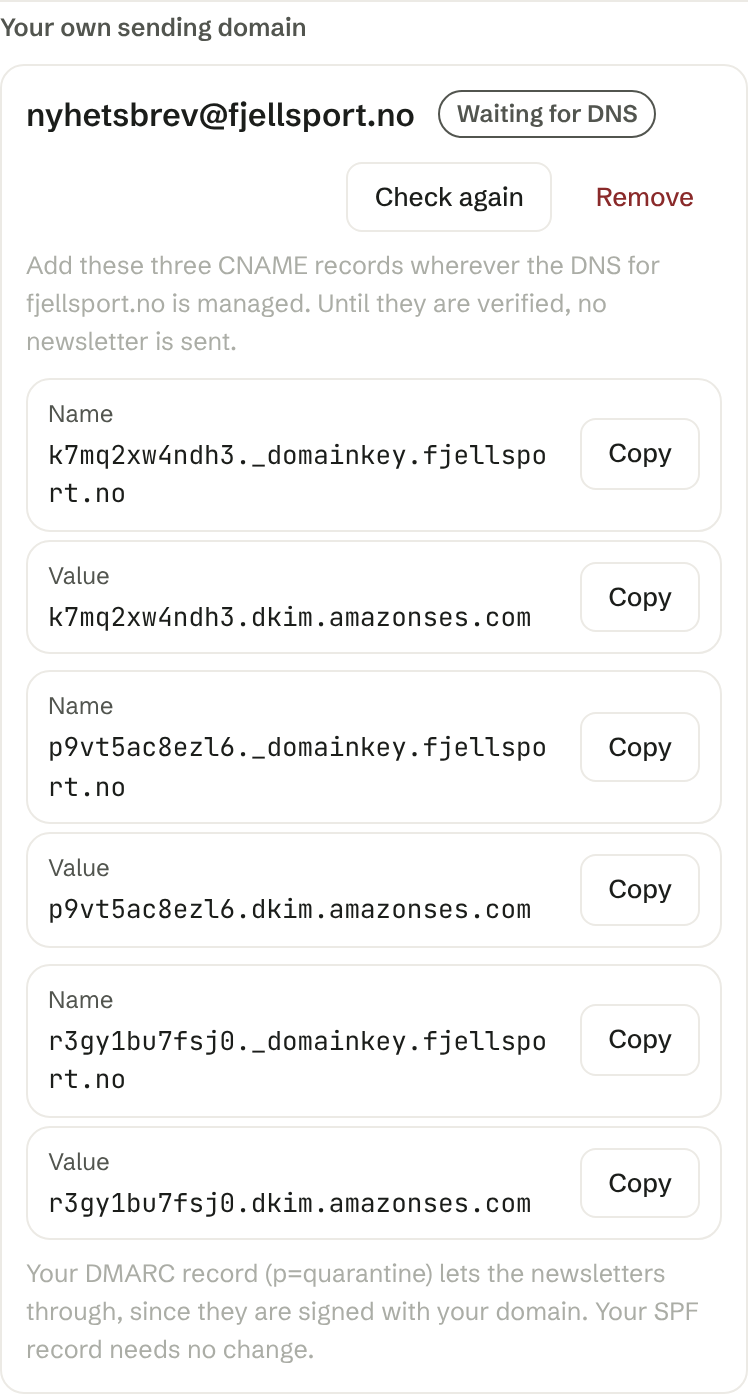
Open Sender: in the send dialog (see Sending a newsletter). Under Your own sending domain, choose one of the domains the workspace has verified and press Set up. You can only choose a domain a colleague has a verified email address on, or a domain you bought through Domains.
Brigg then shows three CNAME records with a Name and a Value, each with a button to copy it. Add them wherever the DNS for the domain is managed, for example at your domain provider. If you bought the domain through Domains in Brigg, we add the records for you.
Status
- Waiting for DNS — the records have not been found yet. It usually takes from a few minutes to a few hours after they are added. Press Check again to see if they are in place.
- Ready — newsletters are sent from nyhetsbrev@ on your domain.
- Not verified — the records were not found within 72 hours. Remove the domain, set it up again and add the new records.
Until the domain is ready, no newsletter is sent, not even a test. Brigg never sends them from its own address instead. To send before the DNS is in place, remove the domain.
Below the records, Brigg says what your domain's DMARC record means. You never need to change your SPF record.
Removing the domain Admin
Press Remove. Newsletters are then sent from Brigg's address again. Records we added to a domain in Domains are removed too.