
Under the summary, Follow-ups lists what has to happen after the meeting.
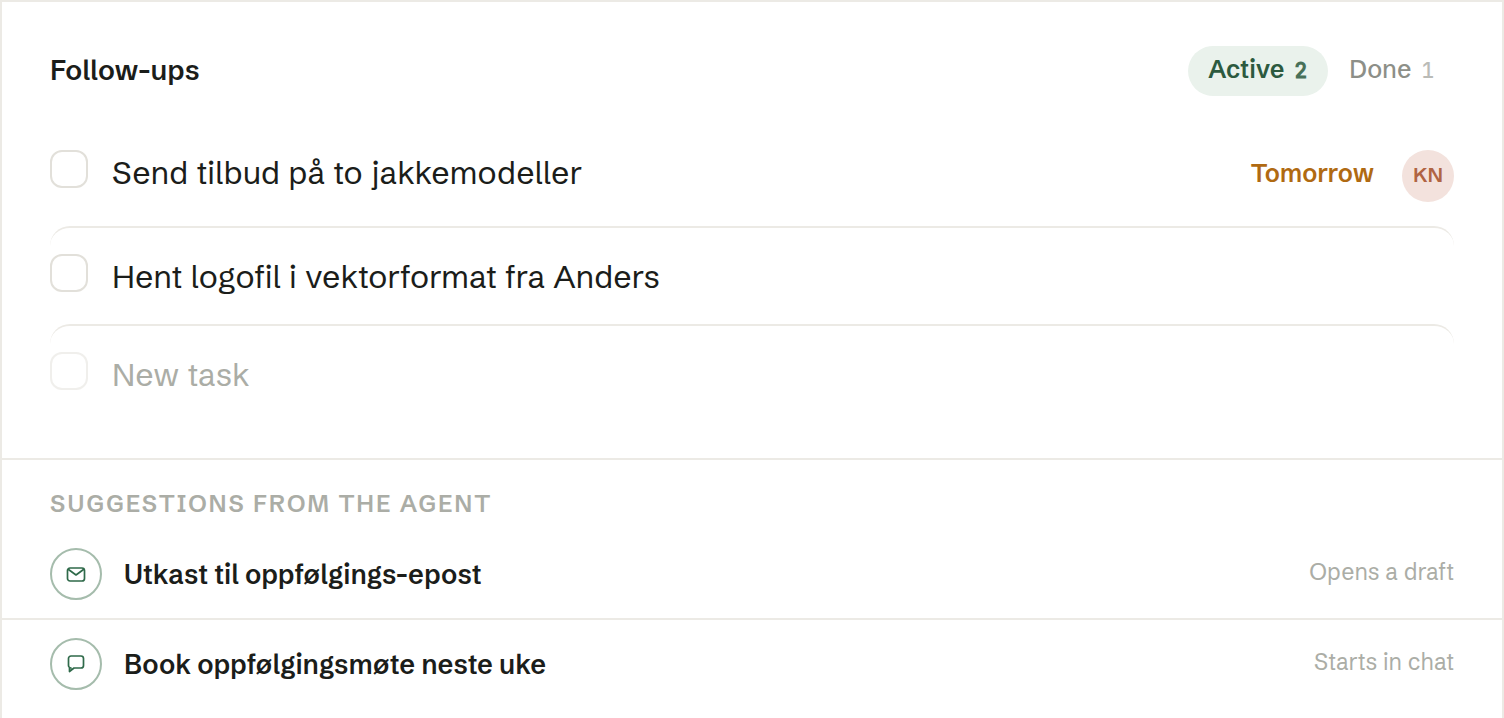
The tasks from the meeting
Colleagues reading the common summary see the same follow-ups. Another recording of that meeting does not create another set of tasks.
When the summary is written, Brigg picks out the tasks the meeting agreed on. A task is given an owner only when the meeting made it clear who; otherwise it is left unassigned for you to decide. Add your own tasks in the empty row at the bottom, and set the status, a due date and who is responsible on each.
On a meeting shared with the team, the tasks are shared too and can be given to any colleague. On a private meeting they are yours alone, and can only be given to you — share the meeting first to hand a task to someone else.
Suggestions from the agent
Below the tasks, the agent suggests next steps it can help with — a few minutes after the summary is ready:
- an email opens a draft you check before sending;
- a chat suggestion sends the request to your chat with the agent;
- a task is carried out by the agent in the background, and the row shows when it is done.
An email draft you have not sent is saved. The row then reads Continue the draft, and the draft stays here even when the suggestions are gone. It is a separate draft from the one Send email opens.
In the summary email
When Brigg sends the summary automatically, each attendee sees the tasks given to them; unassigned tasks go to the people they concern. When you send it yourself with Send email, everyone gets the same email with every follow-up, with owner and due date — see Sending the summary by email.